Stream Info
Update all of your stream information from one place through Casterlabs-Multistream.
From the Stream Info tab of the Casterlabs-Multistream Dashboard you can update all of your stream information from one place.
This includes your Stream Title, Category/Game, and Tags for each of your connected platforms. 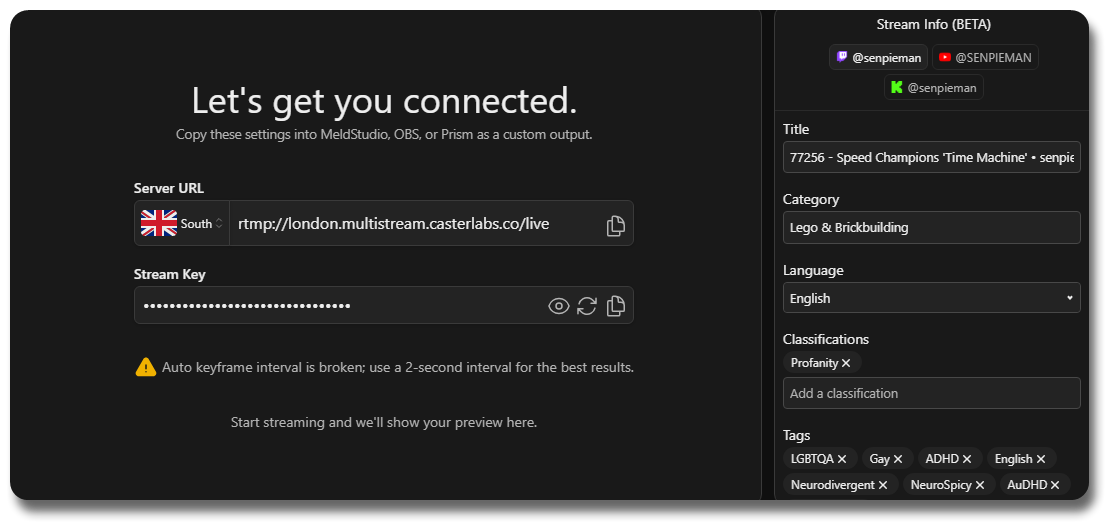
Simply click on the field you want to update, make your changes, and then hit the Save button at the bottom of the page to push those changes to all connected platforms.
Platform Specific Info #
Each platform has its own specific options for stream information. Below is a breakdown of what each platform supports.
Clicking the YouTube button gives you all the information you can set for your stream:
- Stream Title
- Description
- Category / Game
- Tags
all from the Stream Info tab!
You can also add a custom thumbnail for your stream by clicking on the thumbnail image box. As well as being able to switch between making your stream Public, Unlisted, or Private.
From the Twitch tab you can set:
- Stream Title
- Category/Game
- Tags
Just click on the field you want to change, make your edits, and hit Save at the bottom of the page to push those changes to Twitch.
By clicking on the Kick button you can set:
- Stream Title
- Category/Game
Just click on the field you want to change, make your edits, and hit Save at the bottom of the page to push those changes to Kick.
Custom Stream Details #
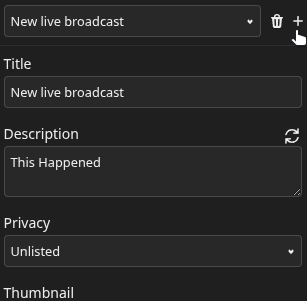
By clicking on the + Icon next to the drop-down menu, you can create custom stream details that you can save and re-use for future streams.
This is useful if you regularly stream similar content and want to quickly apply the same stream information without having to type it all out each time.